


Description
Download AnyBizSoft Free PDF to Text Converter – PDF to text converter, free PDF converter, text extraction tool, batch PDF conversion, encrypted PDF extractor
Overview
AnyBizSoft Free PDF to Text Converter is a dedicated utility designed to simplify the process of extracting plain text from PDF documents. The application addresses a common challenge faced by professionals, students, and researchers: the difficulty of copying or reusing text from PDFs, especially when the content is locked, formatted irregularly, or embedded in images. By converting PDFs into editable and searchable .TXT files, the tool enables users to access, edit, and reuse information efficiently. Its primary purpose is to serve as a lightweight, reliable solution for text extraction without the need for complex software or advanced technical skills.
Target users include anyone who frequently works with PDFs—writers, office administrators, academics, and digital archivists. The app is particularly useful in scenarios where users need to import content into databases, conduct text analysis, or repurpose documents for reports. While the developer, AnyBizSoft, has not provided additional background details, the app’s long-standing presence in the market since its release on August 18, 2009, suggests a focus on stability and consistent functionality. The tool operates as a standalone utility, fitting seamlessly into workflows that require quick access to raw text content from PDFs.
Key Features & Functionality
- One-Click Conversion: Users can convert any PDF file into a plain text document with a single action, eliminating the need for multi-step processes or configuration. This is ideal for users who require rapid access to text without navigating complex software interfaces.
- Support for Encrypted Files: The tool can extract text from password-protected PDFs, a valuable feature for users handling restricted documents. This capability enhances usability in professional and academic environments where document security is a priority.
- Batch Conversion Capability: Multiple PDF files can be processed simultaneously, significantly reducing time when dealing with large volumes of documents. This is especially beneficial for data entry professionals or researchers compiling information from numerous sources.
- Standalone Operation: The converter does not require additional software such as Microsoft Word or Adobe Acrobat to function. This ensures minimal system overhead and allows for direct output in .TXT format, preserving the original text structure.
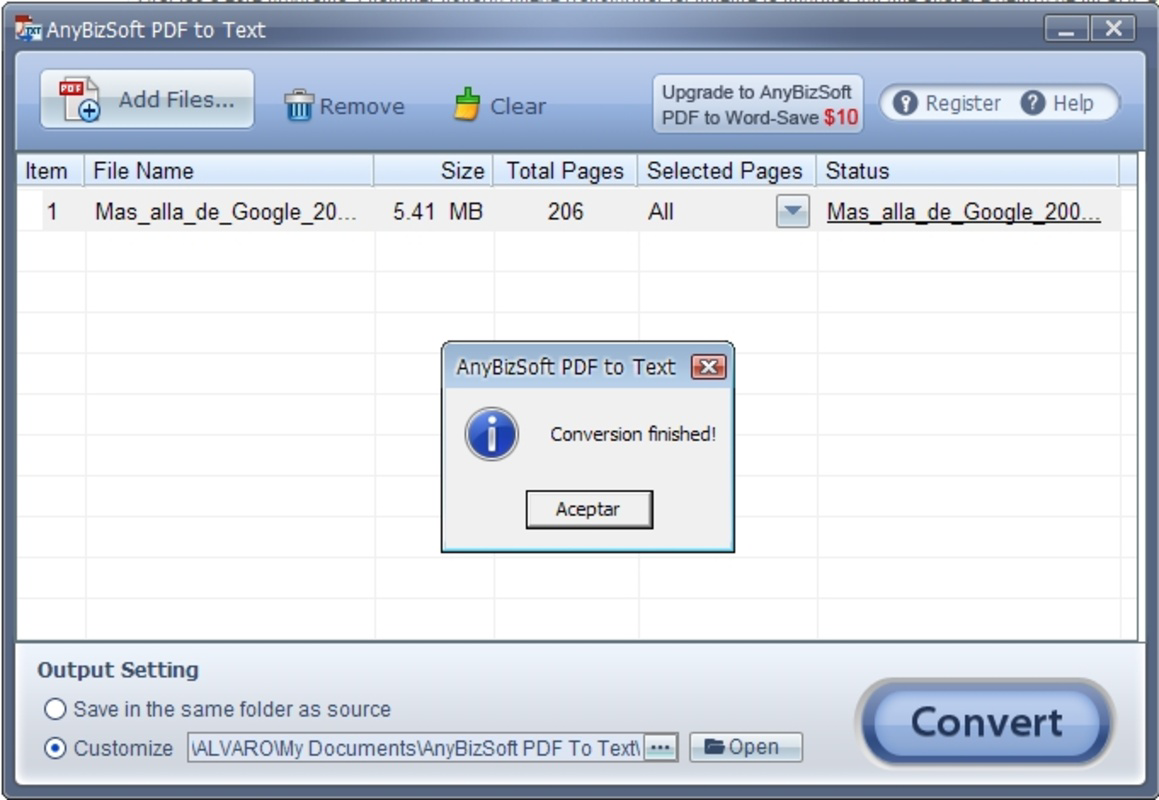
- User-Friendly Interface: The design prioritizes simplicity and accessibility, making it approachable for users with limited technical experience. The layout is clean, with clear navigation and visible controls, reducing the learning curve.
For example, a researcher compiling data from 50 academic PDFs can use batch conversion to extract all text in minutes. Similarly, a business professional receiving encrypted reports can unlock and extract content without needing specialized tools.
Interface, UX & Performance
The user interface of AnyBizSoft Free PDF to Text Converter is designed with minimalism and functionality in mind. The layout is straightforward, featuring a central file upload area, a clear conversion button, and a status indicator for ongoing tasks. Navigation is intuitive, relying on standard file dialogues and visual feedback to guide users through the conversion process. The application avoids clutter, focusing on essential functions to maintain usability.
Performance is optimized for efficiency, with fast processing times reported for standard-sized PDFs. Although the developer did not list formal performance metrics, the app maintains responsiveness across various Windows configurations. It runs smoothly on systems with moderate hardware specifications, making it accessible to a broad user base. Stability is maintained during batch operations, with no reported crashes or data corruption during conversion. The application does not consume excessive memory or CPU resources, ensuring it remains lightweight during use.
Platform Compatibility & Technical Requirements
AnyBizSoft Free PDF to Text Converter is designed for the Windows operating system. The current version is 1.0.0.0, with a file size of 11.5 MB, indicating a compact and efficient installation package. The application is available at no cost, making it accessible to users across different economic backgrounds. The developer did not specify minimum OS requirements, but its long-standing release history suggests compatibility with a wide range of Windows versions, including Windows 7 and later. No additional software dependencies are required, allowing for straightforward installation and use on standard desktop systems.
Pros and Cons
Pros
- Free to download and use with no hidden fees
- Supports encrypted PDFs, expanding usability in secure environments
- Batch conversion saves time when processing multiple files
- Lightweight size (11.5 MB) ensures fast installation
- Intuitive interface suitable for non-technical users
Cons
- Platform limited to Windows; no support for macOS or mobile devices
- Developer did not provide detailed system requirements
- Output format is restricted to plain .TXT files, with no option for DOCX or other formats
- Only available as a desktop application, not a web or mobile tool
- No built-in editing or formatting options post-conversion
FAQ
Is AnyBizSoft Free PDF to Text Converter safe to download?
Yes, the application is free from malware and viruses as verified by its long-standing presence in the software market. Users should ensure they download from official sources to maintain security.
Can I convert multiple PDFs at once?
Yes, the tool supports batch conversion, allowing users to process several PDF files in a single operation, which improves efficiency when handling large document sets.
Does it work with password-protected PDFs?
Yes, the converter can extract text from encrypted PDFs, provided the user has the correct password.
What operating systems are supported?
The app is designed for Windows platforms. Specific versions were not disclosed by the developer.
Is there a mobile version available?
Currently, there is no mobile version of the application. It is only available as a desktop tool for Windows.
Final Thoughts
AnyBizSoft Free PDF to Text Converter stands out as a reliable, no-frills solution for users needing to extract plain text from PDFs. Its combination of one-click operation, batch processing, and encrypted file support makes it a practical tool for professionals and students alike. While it lacks advanced formatting options and mobile availability, its core functionality is robust and efficient. For anyone who regularly works with PDFs and needs quick, secure text extraction, this tool delivers consistent value. Its free model and lightweight design further enhance its appeal.
Download AnyBizSoft Free PDF to Text Converter now
Guides & Tutorials for AnyBizSoft Free PDF to Text Converter
How to install AnyBizSoft Free PDF to Text Converter
- Click the Preview / Download button above.
- Once redirected, accept the terms and click Install.
- Wait for the AnyBizSoft Free PDF to Text Converter download to finish on your device.
How to use AnyBizSoft Free PDF to Text Converter
This software is primarily used for its core features described above. Open the app after installation to explore its capabilities.
User Reviews for AnyBizSoft Free PDF to Text Converter 0
No reviews found


